Hangar 3D Configurator — 3D calculator for hangars and logistics
Web + Windows
A digital calculator for Hebei Guanjia Ltd.—from hangar dimensions and a WebGL model to specifications, logistics from China and a complete commercial proposal.
React 18Three.js 0.158React Three Fiber 8Electron 28ExcelJSPHP + MySQL
40 mmaximum width
2languages
3border crossing
Web + EXEproduct formats
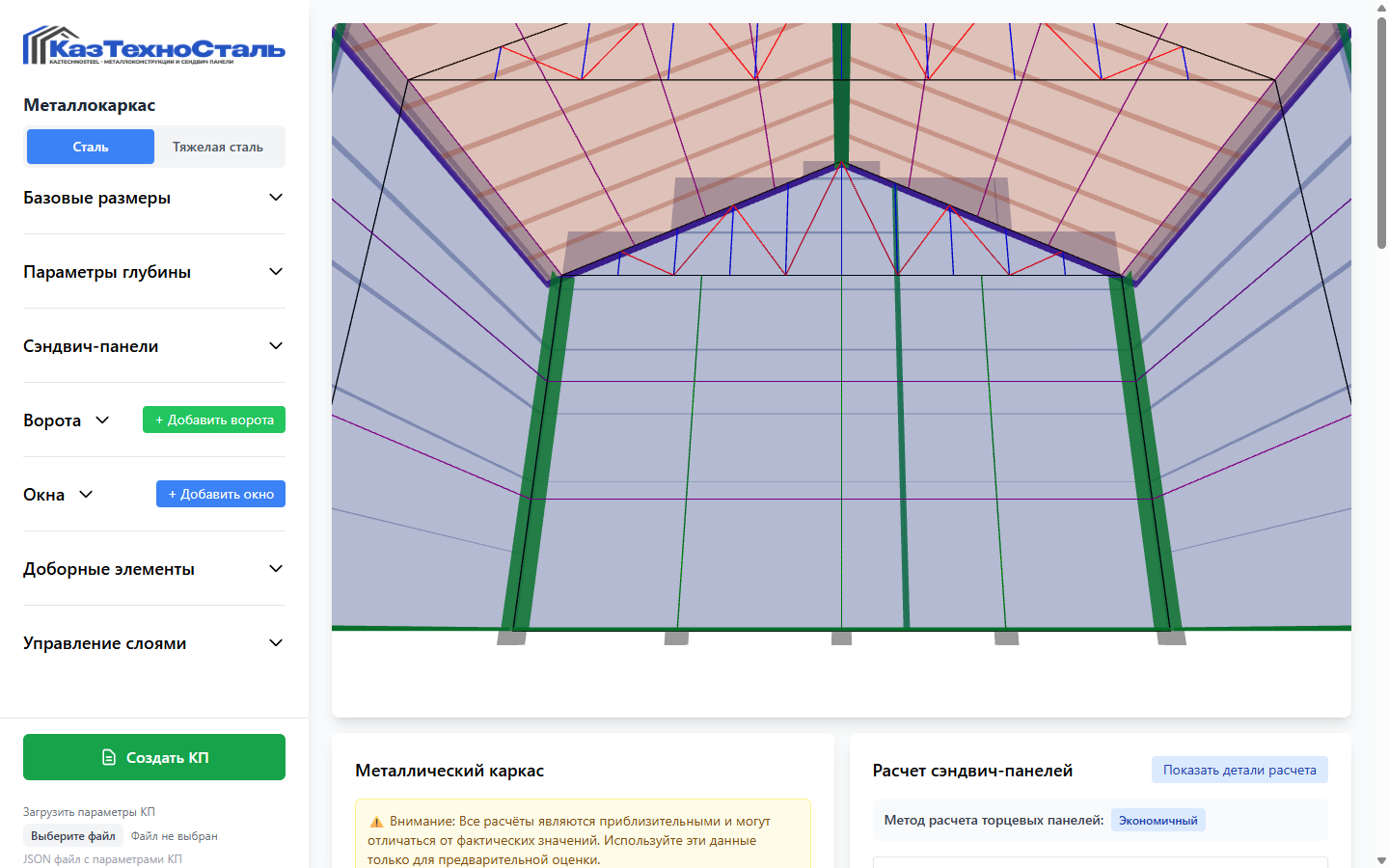
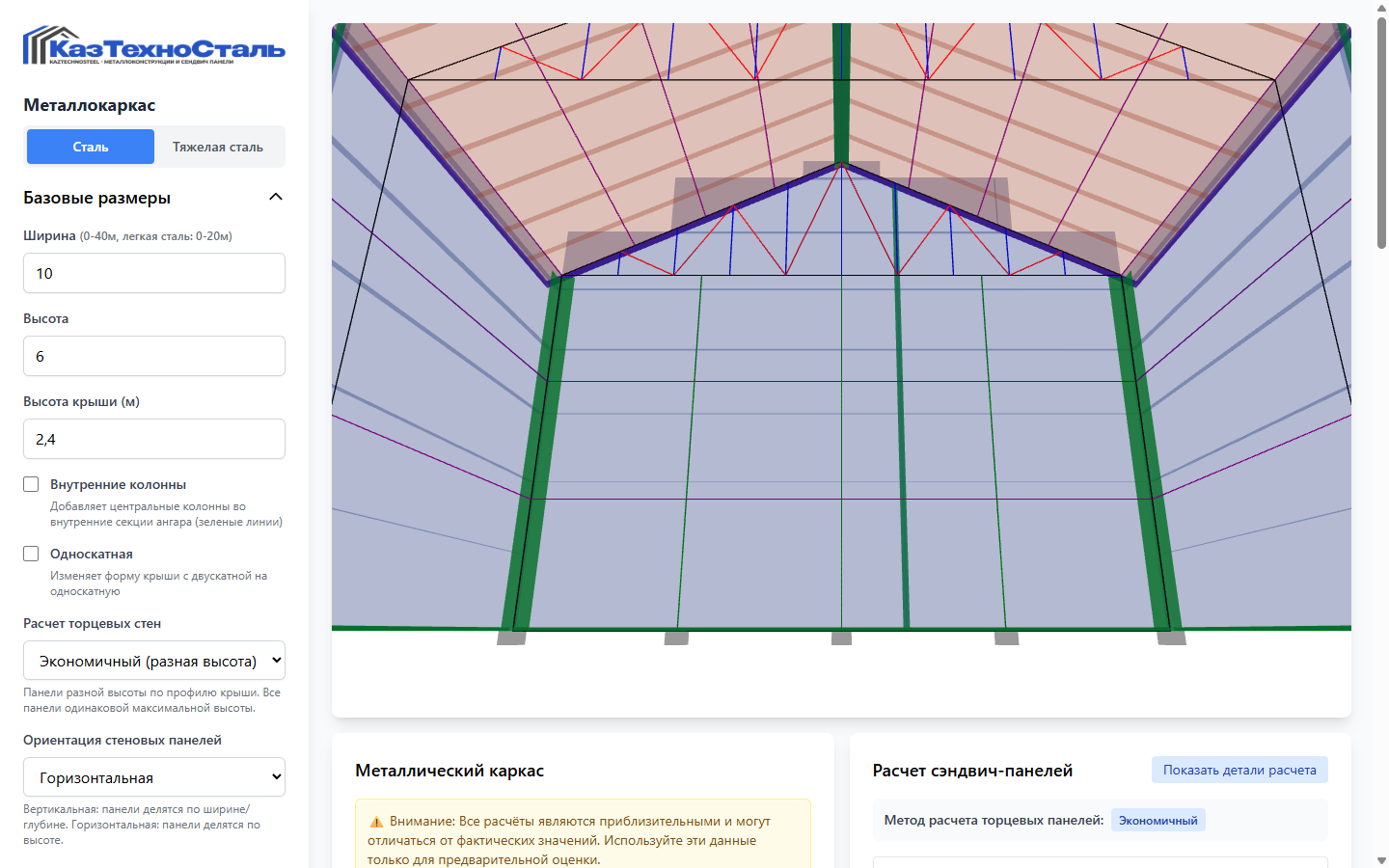
Parametric 3D CalculatorLive interface · actual product interface
01 / Context
Managers lost time switching between spreadsheets, drawings, logistics and margin calculations
When purchasing prefabricated buildings, clients expect quick answers: what the building looks like, how much steel and paneling it requires, how many trucks are needed and what the total cost will be. These parts of a proposal were previously calculated separately and could become inconsistent after a parameter changed. We created a unified parametric system in which one configuration controls geometry, specifications, packing, routing and commercial calculations.
Challenge
Accelerate preparation of complex technical proposals
Solution
Connect the 3D model, materials, logistics and price
02 / Pain Point → Solution
Bridged the gaps between engineering configuration and sales
01
Recalculation Takes Too Long
Changing the width, frame spacing or panel type requires several spreadsheets to be updated manually.
Our Solution
We linked every calculation to a single parametric model, ensuring that geometry, weights, areas and fasteners update consistently.
02
Pricing and 3D Data May Differ
The visualisation is disconnected from the bill of materials, so the client sees one configuration while the commercial proposal calculates another.
Our Solution
React Three Fiber builds the WebGL scene from the same parameters used by the calculation engine.
03
Logistics Are Quoted Separately
Panel packing, the number of lorries and the border crossing require manual reconciliation and repeated data entry.
Our Solution
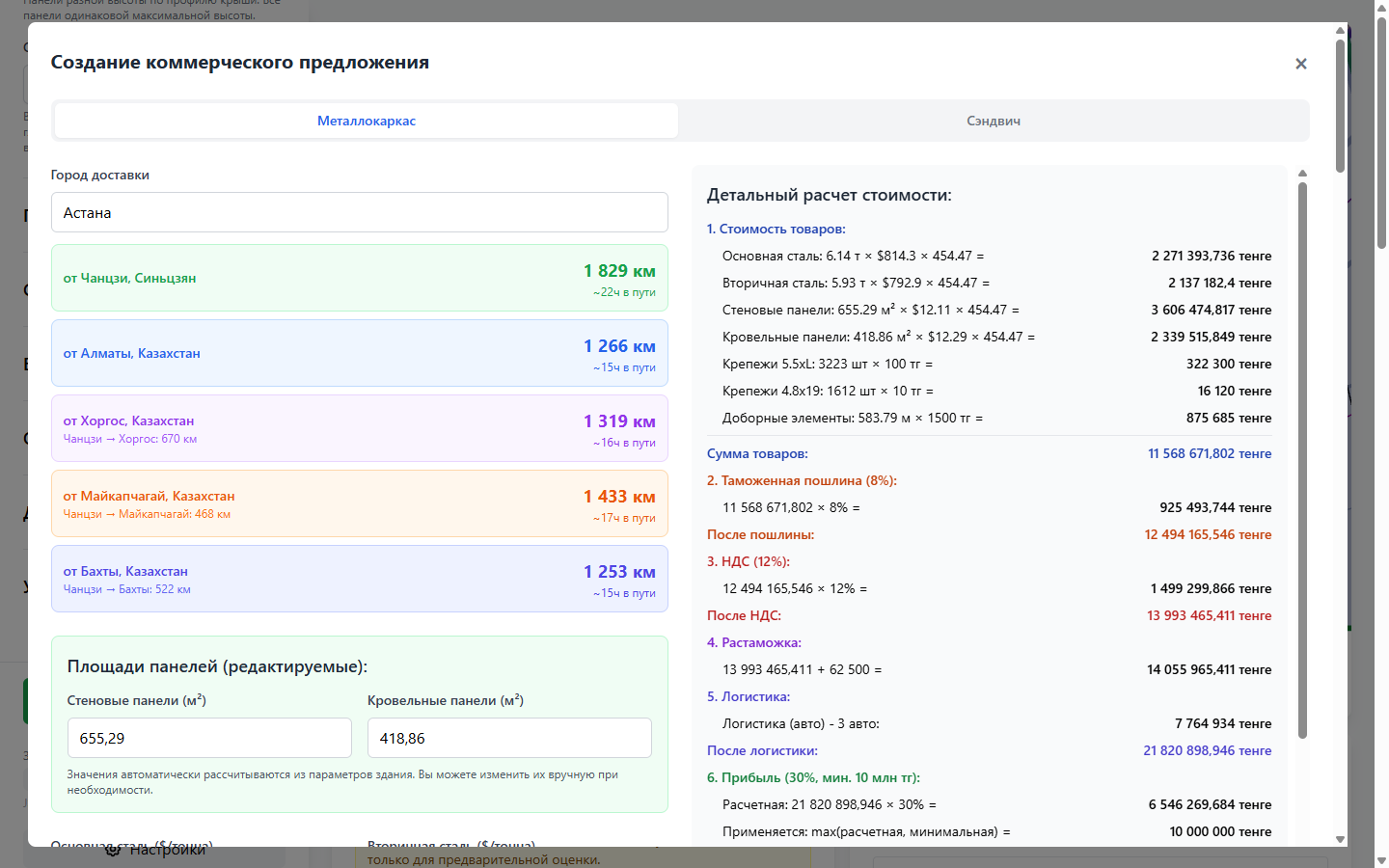
We added a batching algorithm, drag-and-drop allocation across vehicles and route comparison via Khorgos, Maikapchagai and Bakhty.
04
The Offering Is Difficult to Explain to Clients
A spreadsheet cannot show the future structure, and calculation versions get lost in correspondence.
Our Solution
We produced a branded Excel file and a short link to an interactive 3D model, with the option to restore the JSON configuration.
03 / Information Architecture
The user journey is built around a meaningful task
Building Parameters→Calculation Engine→3D geometry→Bill of Materials→Packaging and Trucks→Routing and Taxes→Excel + 3D Link
The architecture was verified using the supplied documentation, application structure and genuine product screens.
04 / Core UX
A single change updates both the structure and the commercial model
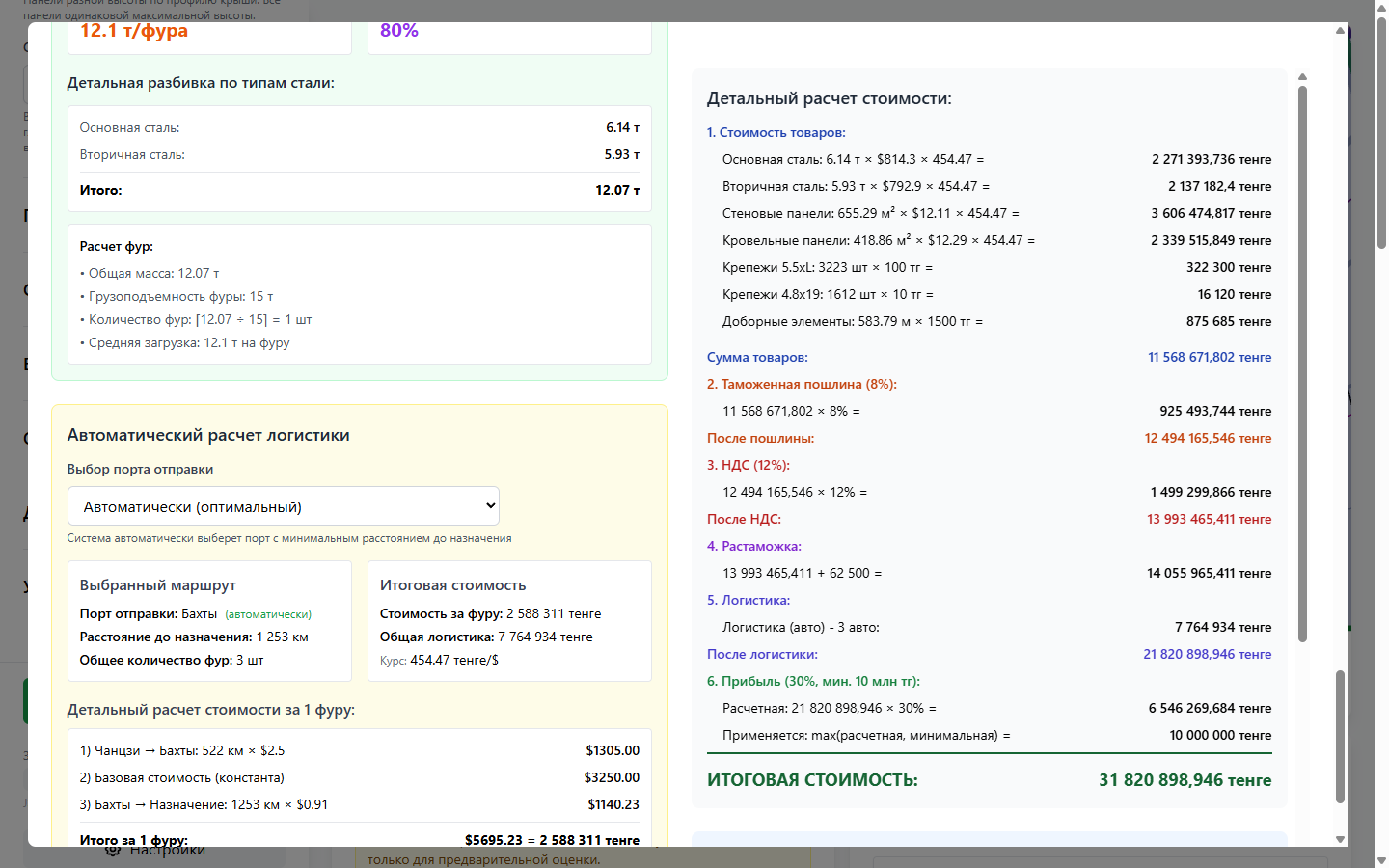
Managers configure dimensions, sections, roof layout, steel type, panels, gates and windows. The system immediately recalculates frames, trusses, columns, bracing, purlins, areas, fasteners and accessories. In the same session, they can check vehicle loading, select a route and apply exchange rates, duty, VAT, customs clearance and margin.
Parameter ManagementGeometry, structural design and materials in a single sidebarLogistics and Final PriceWeight, trucks, route, duty, VAT, delivery and profit
05 / Content Model
The calculation is split into modules but uses one project configuration
BuildingConfig
Geometry
Width, height, roof, sections, frame spacing and steel type
Envelope
Panels and Openings
Walls, roof, layout, windows, gates and finishing elements
Bill of materials
Specification
Lengths, Areas, Weights, Quantities, and Fasteners
PackagePlan
Packaging
Bundles calculated by type, length, thickness, pallet and truck limits
CommercialModel
Economy
Product price, exchange rate, duty, VAT, clearance, logistics and margin
SharedConfig
Collaboration
JSON, LZ-String, short URL, visits and project recovery
06 / Technology Stack
Visualisation, calculations, documents and collaboration can evolve independently
React 18 + Vite 5Component-based application, hooks and fast production buildThree.js 0.158 + R3F 8Parametric WebGL scene, camera, layers and transparencyExcelJSPopulating branded XLSX templates for steel and panelsdnd-kitManual adjustment of bundles and allocation across vehiclesPHP + PDO + MySQLREST-like service for short links and click statisticsElectron 28 + NSISWindows application with an isolated preload context
07 / Interactive Flows
The interface helps users complete tasks without unnecessary navigation
Orbit controls
Camera rotation, zoom and movement
Layer control
Frame, panels, openings and joints with independent visibility
Live recalculation
Instant geometry and bill of materials updates
Truck planning
Automatic packing and manual drag-and-drop
08 / Product Delivery
A calculation can be opened in a browser, restored from a file or shared with a client
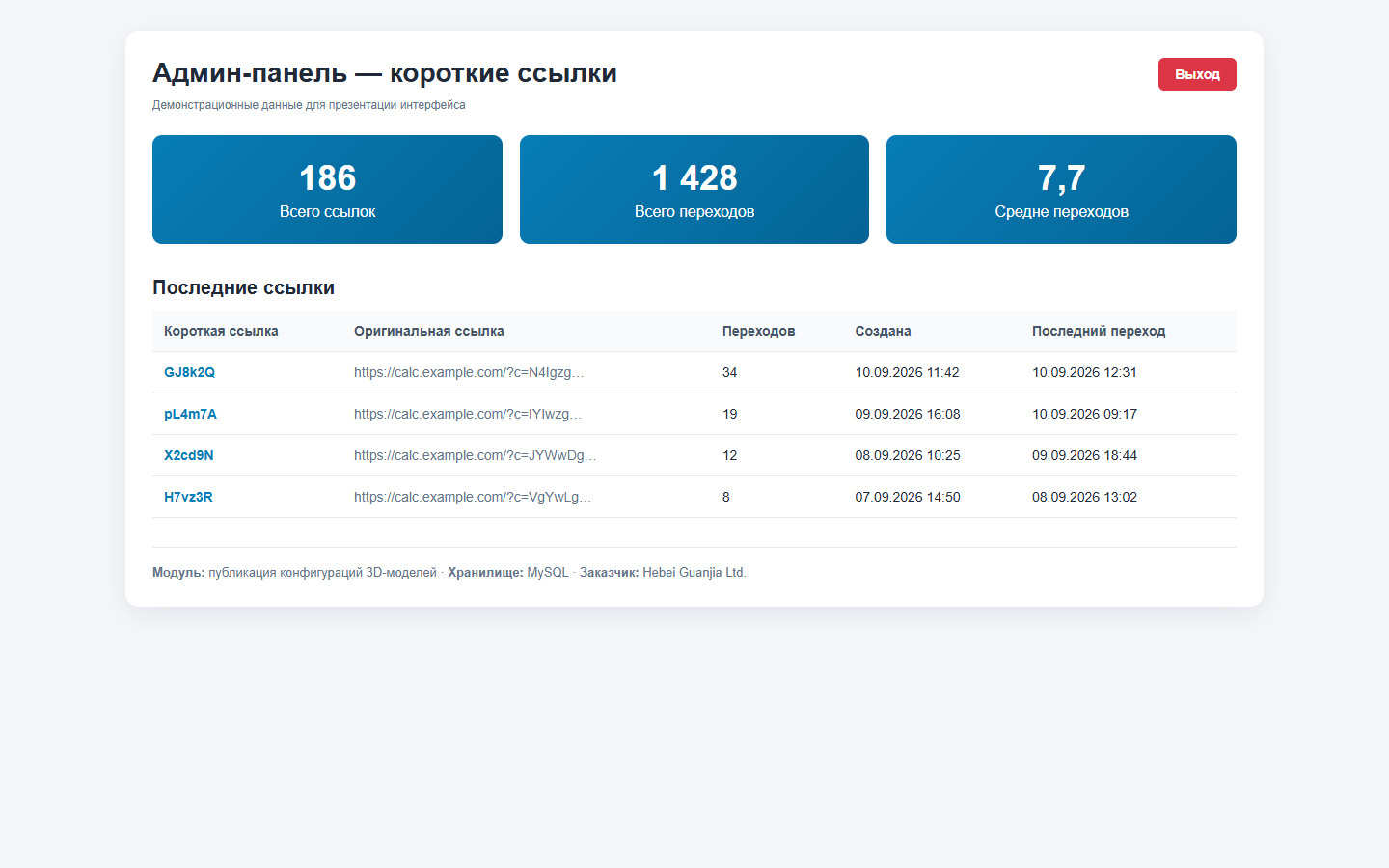
The calculator runs in the browser and as a Windows application. Configurations are saved as JSON, compressed with LZ-String for sharing by link and restored without re-entry. The static web build is ready for Vercel, Netlify or PHP/Plesk, and the desktop build generates an NSIS installer. The administration module displays published links and visits.
React + WebGLweb client
LZ-Stringcompact link
NSISWindows installer
XLSXcommercial document
Calculations are presented as preliminary estimates for preparing proposals. They require engineering verification and do not replace structural design, load-bearing calculations or construction documentation. Figures shown in the administration screen are demonstration data.
09 / Control Framework
The commercial module shows clients the price breakdown while allowing managers to retain control over rates
Costs are assembled step by step: products, fasteners, accessories, customs duty, VAT, clearance, logistics and profit. Managers can adjust rates and areas, compare routes and generate a document from a branded template without moving data to an external spreadsheet.
Material pricing linked to the current configuration
The route can be selected automatically or set manually
The Number of Trucks Depends on Weight and Packaging
Margin and mandatory charges are shown as separate line items
The technical architecture covers the entire pre-sales cycle
01
Parametric Geometry
Light and heavy steel, mono-pitch and dual-pitch roofs, internal columns and sections.
02
Automatic Switching
At widths above 20 m, the design switches to heavy steel; the interface limit is 40 m.
03
Panel Cutting
Economy and standardized options for end walls.
04
Transport
Bundles account for length, thickness, pallet and vehicle restrictions.
05
Commerce
Customs duties, VAT, clearance, logistics and profit are calculated in sequence.
06
Export
ExcelJS populates the XLSX template, while JSON restores the original configuration.
11 / Real Interfaces
Key journeys demonstrated through working product screens
Published Model ManagementShort links and click statistics with demonstration dataAnimated 3D ModelLive WebGL model: hangar rotation and geometry validation
12 / Result
Sales managers gain a single tool for client discussions: they demonstrate the building in 3D, change parameters in real time, explain the material specification, compare delivery options and issue a consistent commercial proposal.
The product reduces manual work and the risk of discrepancies between the visualisation, specification and price. Actual time savings and conversion growth should be measured during live operation.
React 18Three.js 0.158React Three Fiber 8Electron 28ExcelJS
Next Project
Need a calculator that turns a complex product into a clear commercial proposal?
We will analyse the audiences, content, integrations and search demand, then design the structure and technical architecture before visual design begins.